

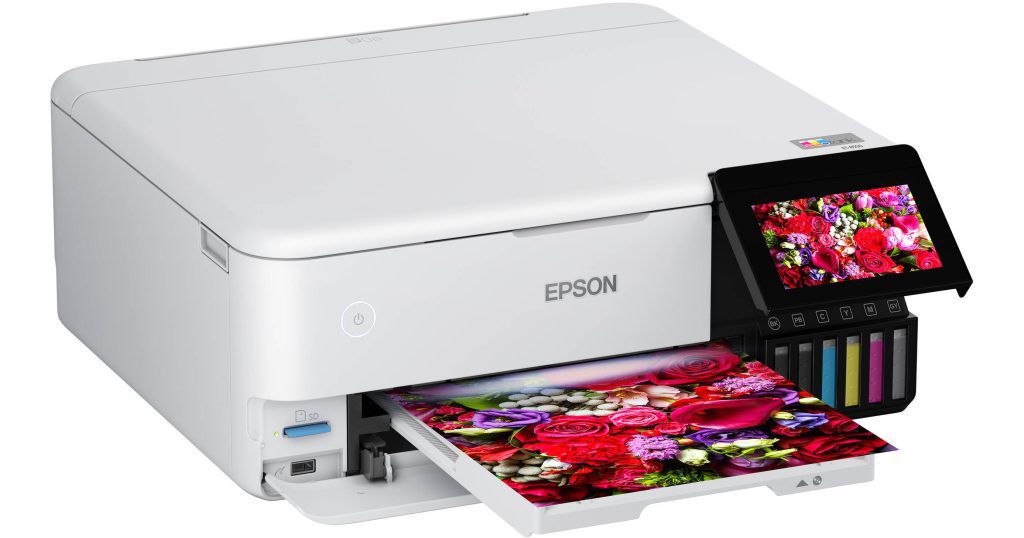
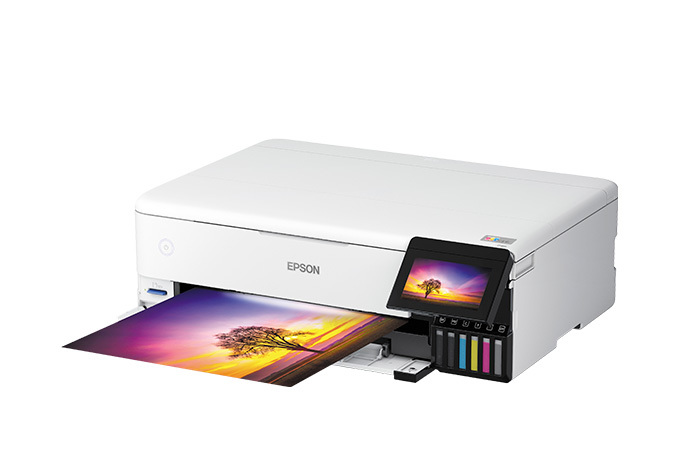
Whether it's photo printing for home or creative workspaces, the Epson EcoTank Photo series has a reputation for its combination of lab-grade print quality and ultra-low-cost inks. Two models that stand out are the Epson EcoTank Photo ET-8500 and ET-8550. They look similar, but Epson tailored them to different needs: the ET-8500 is for high-quality letter/A4 printing, while the ET-8550 is for larger formats up to 13" x 19". This article will explore the similarities and differences between the Epson 8500 vs 8550, and which one is better for your personal or professional use.
Overview of Epson 8500 and Epson 8550
The Epson EcoTank Photo ET-8500 and Epson EcoTank Photo ET-8550 are high-performance all-in-one printers designed for photographers, artists and creative professionals.
What sets them apart from ordinary printers is that they use the Epson Claria ET Premium six-color ink system and cartridge-free EcoTank design. Instead of expensive and wasteful ink cartridges, they use refillable, high-capacity ink cartridges for ultra-low running costs, especially when printing high-resolution images. They have the following in common:
Shared Core Features:
- Print Technology: MicroPiezo Heat-Free Inkjet technology
- Ink Type: Claria ET Premium (6 colors: pigment black, photo black, cyan, magenta, yellow, gray)
- Print Resolution: Up to 5760 x 1440 optimized dpi
- Connectivity: USB, Ethernet, Wi-Fi, Wi-Fi Direct, Apple AirPrint, Mopria, and Epson Smart Panel app
- Touchscreen: 4.3-inch color display
- Media Support: Rear specialty media tray for cardstock (up to 1.3mm thick), borderless photo printing, and double-sided printing
- Ink Capacity: One set of bottles yields ~6,200 black pages and 6,200 color pages
Unique EcoTank Advantages:
- Cost Efficiency: One full set of ink can last years for most users; cost per 4x6" photo is as low as 4 cents
- Environmentally Friendly: Fewer plastic parts, less waste, and lower power consumption than traditional cartridge printers
Epson 8500 vs 8550, What Is the Difference?
While both the Epson EcoTank Photo ET-8500 and ET-8550 share the Claria ET Premium six-ink system and base print engine, they differ significantly in terms of workflow, creative flexibility, and suitability for use cases.
Print Size and Media Support
The most obvious difference between the two models is the maximum media size.
| Feature | ET‑8500 | ET‑8550 |
| Max Media Size | A4 / 8.5″ x 11″ | A3+ / 13″ x 19″ |
| Borderless Printing | Yes, up to A4 | Yes, up to A3+ |
| Banner Printing | No | Yes (up to 2 meters long) |
| CD/DVD Disc Printing | Yes (via tray) | No |
If you need to work with wide-format artwork, digital scrapbooks, gallery photo prints, posters or proofs, the ET-8550 is the right choice. It also supports rear-feed printing of panoramic and banner media up to 2 meters (78 inches), which the ET-8500 cannot do.
On the other hand, if your work is no larger than 8.5" x 11" (letter) or A4, the ET-8500 will meet your needs without the extra size and cost.
Image Quality and Output
Despite the size differences, both printers use exactly the same ink combination and print resolution:
- Print Resolution: Up to 5760 x 1440 dpi
-
Ink: Claria ET Premium – 6 colors:
- Pigment Black: For sharp text and crisp documents
- Photo Black: For deep blacks in images
- Cyan, Magenta, Yellow: For color mixing
- Gray: For neutral gradation in B&W prints
Photo Quality Notes:
- Color Accuracy: Very high with subtle tones and accurate skin tones.
- B&W Quality: Gray ink plays an important role in crisp transitions, especially in black and white portraits and landscapes.
- Print Longevity: Epson claims that Claria ET inks will resist fading for up to 300 years (album) when printed on archival paper.
The Eposn ET-8550 may produce slightly smoother gradations when printing in large format, simply because it prints at higher sizes at full resolution. However, the image quality itself is essentially the same at A4 size.
Paper Handling
Both printers offer a wide range of input options, but the Epson 8550 is better suited for high-end, creative, and specialty media workflows.
| Tray or Feed | ET‑8500 | ET‑8550 |
| Front Tray 1 | Up to 100 sheets plain paper (A4) | Same |
| Front Tray 2 | 20 sheets photo paper (5x7 or smaller) | Same |
| Rear Feed | Single-sheet feed for thick paper (up to 1.3 mm) | Same |
| CD/DVD Tray | Yes (removable) | No |
Both printers can print on card stock, fine art paper, and canvas via the rear tray.
The ET-8550 supports larger paper sizes (e.g. 11x17, 13x19, 12x12 square scrapbook paper) and banner rolls.
If you print directly to DVD or Blu-ray Disc, only the ET-8500 includes the required tray.
Scanning and Copying
Both printers have flatbed CIS scanners rather than document feeders, so scanning large volumes of documents isn’t their focus.
| Feature | ET‑8500 | ET‑8550 |
| Scanner Type | Flatbed (CIS) | Flatbed (CIS) |
| Optical Resolution | 1200 x 4800 dpi | 1200 x 4800 dpi |
| Max Scan Size | A4 (8.5" x 11.7") | A4 (8.5" x 11.7") |
| ADF Support | No | No |
The ET-8550 can only scan up to A4, so it's not a wide-format scanner, although it can print up to A3+ size. Both can scan directly to email, the cloud or a mobile device using Epson's software.
Connectivity and Input Options
Basic connectivity options are similar, with USB 2.0, Ethernet, Wi-Fi (2.4GHz + 5GHz), Wi-Fi Direct (no router required), AirPrint, Mopria, Google Cloud Print, the Epson Smart Panel mobile app, and more.
However, the ET‑8550 also includes two key additional features:
| Input Type | ET‑8500 | ET‑8550 |
| USB Host Port | Yes | Yes |
| SD Card Reader | No | Yes |
| Voice Control Support | No | Yes (Alexa, Google Assistant) |
With an SD card slot, photographers can insert a memory card and print directly without connecting to a computer. Voice support adds hands-free flexibility for smart homes and studios.
Software and Workflow Support
Both printers are compatible with Windows and macOS and include:
- Epson Smart Panel mobile app (iOS/Android)
- Epson Scan 2
- Epson Photo+ editor
- ICC color profile support for professional color matching
- Epson Print Layout plugin (Lightroom/Photoshop compatible)
This makes them perfect for professional photographers or designers who use a color-managed workflow.
The ET-8550’s mobile-first features (SD card reader, Smart Panel integration, and voice printing) create a more flexible workflow for mobile creators or home photo managers.
Power, Noise, and Efficiency
| Metric | ET‑8500 | ET‑8550 |
| Power Consumption (printing) | 17 W | 17 W |
| Power Save Mode | 0.8 W | 0.8 W |
| Operating Noise | ~34 dB(A) | ~34 dB(A) |
These values are almost identical. Both devices are very quiet in operation and are perfect for use in a home office or studio.
Price and Operating Cost
| Model | MSRP (US) | Avg. Street Price |
| Epson ET‑8500 | ~$599 | ~$550–$649 |
| Epson ET‑8550 | ~$699–$799 | ~$680–$749 |
Both use the same refillable Claria ET Premium ink bottles:
- Cost per ink bottle: ~$17 (black) / ~$15 (color)
- Page yield (per bottle): ~6,200 pages black, ~6,200 pages color (photo yield varies)
- Cost per 4x6 photo: As low as 4¢ (vs. 40¢+ for cartridge models)
Over time, either printer will pay for itself in ink cost savings, especially for someone who prints dozens of full-color pages or photos each week.
Summary of Differences
| Category | ET‑8500 | ET‑8550 |
| Max Print Size | A4 / 8.5" x 11" | A3+ / 13" x 19", banners |
| CD/DVD Disc Printing | ✔ Yes | ✘ No |
| SD Card Support | ✘ No | ✔ Yes |
| Voice Printing | ✘ No | ✔ Yes |
| Banner Printing | ✘ No | ✔ Yes (up to 2m) |
| Footprint | Smaller, lighter | Larger, heavier |
| Price | Lower (~$599) | Higher (~$699–$799) |
| Best For | Standard photo and document use | Wide-format creative workflows |
Epson 8500 vs 8550, Which One Should You Choose?
Still undecided? Here are some quick recommendations:
Choose the Epson ET-8500 if:
- You only need to print standard photo sizes (4x6, 5x7, 8x10)
- You want CD/DVD disc printing
- You have limited desk space
- You want to save $100+
Choose the Epson ET-8550 if:
- You want to print large-format (13" x 19") visuals
- You print on specialty paper or banners
- You need SD card support or voice control
- You’re a photographer, designer, or artist seeking maximum flexibility
Wrap It Up
Epson's ET-8500 and ET-8550 both offer premium photo printing, ultra-low running costs, and modern connectivity in a compact, cartridge-free design. The right choice depends not on print quality (the two are virtually identical in terms of print quality) but on your creative needs and print size. For most home users, the ET-8500 is more than adequate. But for creatives or professionals who value format freedom, the ET-8550 is definitely a worthy upgrade.


